

SEO (Search Engine Optimisation) is the set of strategies used to optimise a website so that it ranks among the top results for a user's specific search.
Within SEO we have On Page, which covers the optimisation of content and internal structure, and Off Page, which is link building. Both are essential for ranking.
If you already have a link building campaign under way, there is one element you should not overlook: internal links.
In this article we will look at what internal links are, how important they are for link building and SEO, what types exist and what to bear in mind when implementing them. Keep reading, because you may be missing a great opportunity without realising it.
What are internal links?
Internal links are links that connect two pages within the same website, with the aim of making it easier for search engines to index the content, distributing authority (link juice) and improving navigation and the user experience on the site.
This practice is called interlinking or internal linking, and it is the foundation of good link building.
It is done using anchor text, the word you click on to be taken to the new internal page. It stands out from normal text because it appears underlined or in a different colour so that users can identify it more easily.
Imagine a user is searching for "best link building platforms to buy links" and, on opening one of the top results, notices while reading that the most important platforms are mentioned, with links to each of them.
If you click on any of those internal links, it takes you to another page on the same website, where the advantages of these link buying platforms are explained.
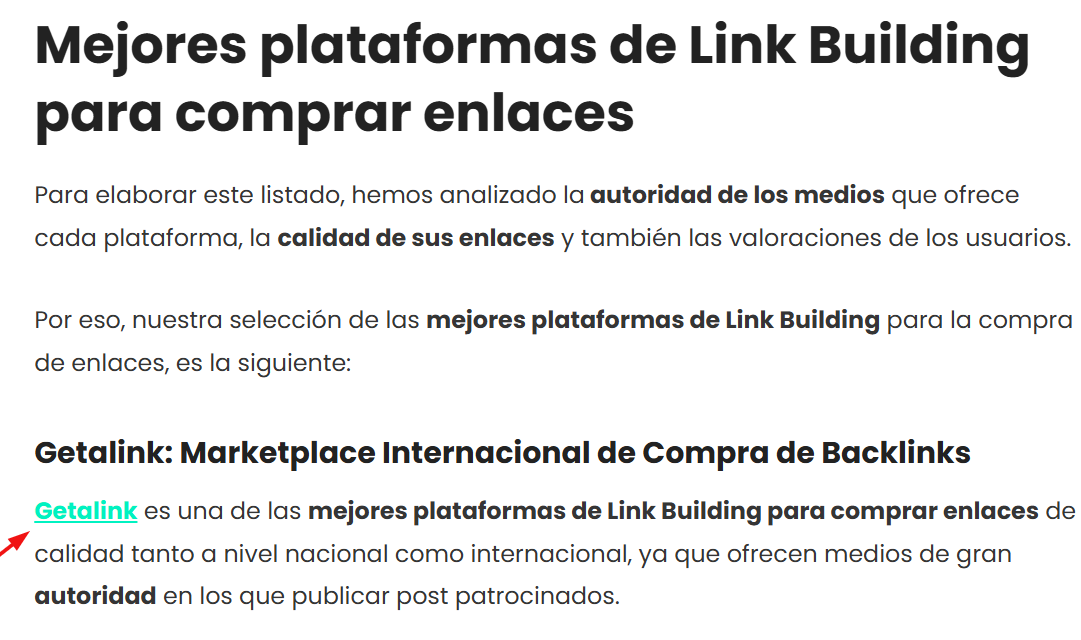
Internal linking is therefore giving you useful information on that topic, so you will stay reading and browsing for longer on this page; this is one of the ranking factors Google takes into account, hence its importance.
Let's look at it in more detail:
Why are internal links important for SEO?
– Internal links improve the navigation and usability of your site, so they increase the time readers spend on your website. As a result, your SEO will improve, since this is one of the ranking factors Google takes into account.
– They also improve the crawling and indexing of the site, as these internal links help search engines understand and index all the pages of a site, giving them a better grasp of its hierarchy and the relationship between its content.
What's more, when a page receives many internal links, search engines interpret it as more relevant, which increases its chances of appearing in search results. That is why a good internal linking strategy not only helps indexing but directly improves SEO rankings.
– Internal links distribute the authority gained through link building campaigns across the pages of a website.
This transfer of strength (authority) is known as Link Juice. The more authority the source page has, the greater the value it passes on to the destination.
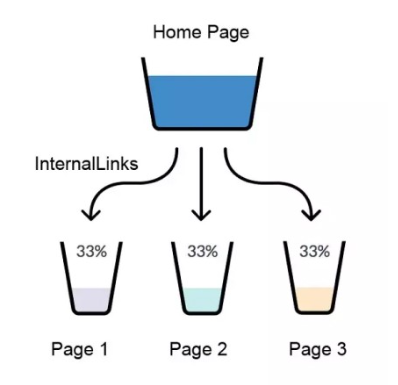
Every page on a website has a certain level of authority, which Google assesses using the PageRank metric. This metric is based on the idea that a page is more relevant the more quality links it receives.
So what is the difference between the two?
PageRank is a metric that measures the strength (authority) of a page, while link juice is the strength passed on (through internal linking) between pages on the same site.
That is why linking from powerful pages such as the home page, main categories or content that already ranks to other pages you want to boost can be an effective example of a strategy.
– Internal linking reinforces topical relevance. By using suitable anchor text, you are telling search engines what the linked pages are about, improving their ranking for specific keywords.
What should the ideal anchor text look like?
Ideally, the anchor text should be relevant to the content it links to and should also be:
Natural: The more smoothly and naturally it fits into the text, without forcing keywords in, the better.
Descriptive and relevant: It should clearly reflect the content of the destination page, so that both users and Google understand what the link is about.
Varied: Use a mix of different types of anchor text, such as exact match (matching the keyword) and partial match (including variations), to avoid over-optimisation.
Avoid using the same keyword, as Google may interpret this as spam; diversifying the text will help improve the user experience and SEO relevance.
What are the types of internal links?
Based on their location, the types of internal links are as follows:
Navigation links
These are the internal links found in the menu, and their purpose is to help users move between the main pages of the website.
Footer links are also navigation links; they sit at the bottom of the website and link to pages such as contact or FAQs.
Another type of navigation link is sidebar links, which are used to direct users towards other content. For example, to take an action such as signing up for a tool or subscribing to a newsletter.
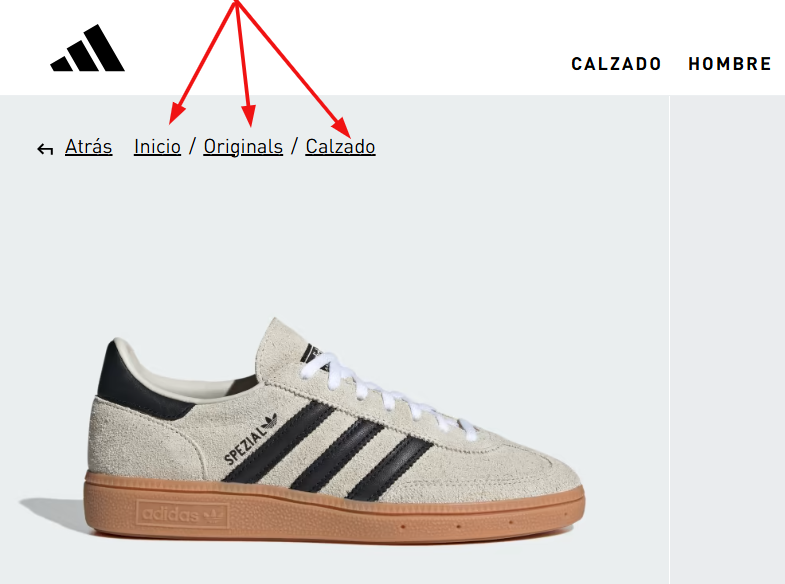
Breadcrumbs are internal navigation links that show the site's hierarchy and make it easier for users to navigate. This reduces the bounce rate and improves the user experience, both important factors for SEO.
This type of internal linking is used mainly in e-commerce sites. For example: Home > Category > Subcategory > Product.
Contextual links
Contextual links are naturally integrated into the content of a page; their role is to offer further relevant information related to the topic that brought the user to the site.
These links help both users and search engines discover related content, improving the site's navigation and usability for users and its SEO in Google's eyes.
Links from blog to product or category
When you publish an article on the blog, link within the content to a product or related category.
For example, if you offer link building services, you could write an article titled "Why does your website need professional link building advice?" and include links in the text to the different services you offer, such as personalised consultancy.
Get started nowFollowing this same approach, you can also link:
– From category pages to other complementary categories.
– From blog content to other blog content, to expand on information or reinforce related topics.
Product-to-product links (related items)
Linking products to one another (such as different prices or colours of the same product) is a good interlinking (internal linking) strategy, both for improving the user experience and for SEO.
If you have an online shop, including "related items" at the bottom of product pages improves your e-commerce SEO rankings, as these links keep users browsing the site for longer.
Image links
These are internal links applied to images, so that when users click on them they are redirected to another internal page on the site. They are very useful on sites such as product galleries or portfolios, as they allow users to interact with the content and stay longer on the website or online shop.
Types of internal links by attribute
The types of internal links based on their attribute are:
The follow attribute is the most recommended for internal links, as it allows Googlebot to crawl and distribute authority between the pages of your site.
Nofollow: Not recommended for internal links, unless they point to pages you do not want Google to index, such as the legal notice or privacy page.
Sponsored: Used for links that come from collaborations or sponsorship.
UGC (User Generated Content): Used for links generated by users, such as in comments or forums.
Internal links vs external links
Internal links make navigation easier for users, allow search engines to crawl content more effectively and distribute authority between the pages of the site itself.
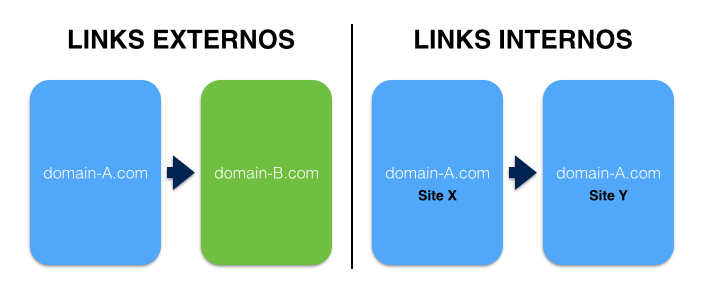
External links (backlinks) connect your site with other relevant domains with a good reputation. They can be inbound, when other sites link to yours, or outbound, when you link to external pages.
This strategy of building external links is called link building. Thanks to it, you gain the authority needed to improve your site's SEO.
Get started nowAn effective SEO strategy should include a balanced and strategic use of both types of links, internal and external.
Internal linking strategy, examples
This could be an example of how to create an internal linking strategy. The first thing you should do is identify the main pages, group them by topic and define the hierarchy.
It is essential to use the main keywords at the upper levels of the structure, especially on pillar pages, which act as content hubs and link to other related pages.
It is also advisable to update old content by adding links to new pages, identify the pages with the most authority and regularly review the structure to optimise it.
Internal linking mistakes to avoid
Not using optimised anchor text: Using generic text such as "click here" or always repeating the same anchor text.
Not keeping track of links: Without proper monitoring, you may repeat unnecessary links or forget key pages.
Infinite scroll: On websites with infinite scroll (especially blogs or shops), many pages are not linked directly, making them harder for Google to crawl and index.
Orphan pages: These are pages that receive no internal links. As they are not connected, they go unnoticed by both users and search engines.
Having broken links on the website: Links pointing to pages that no longer exist or have been moved harm the user experience and can damage SEO if they are not fixed.
How do you analyse internal links?
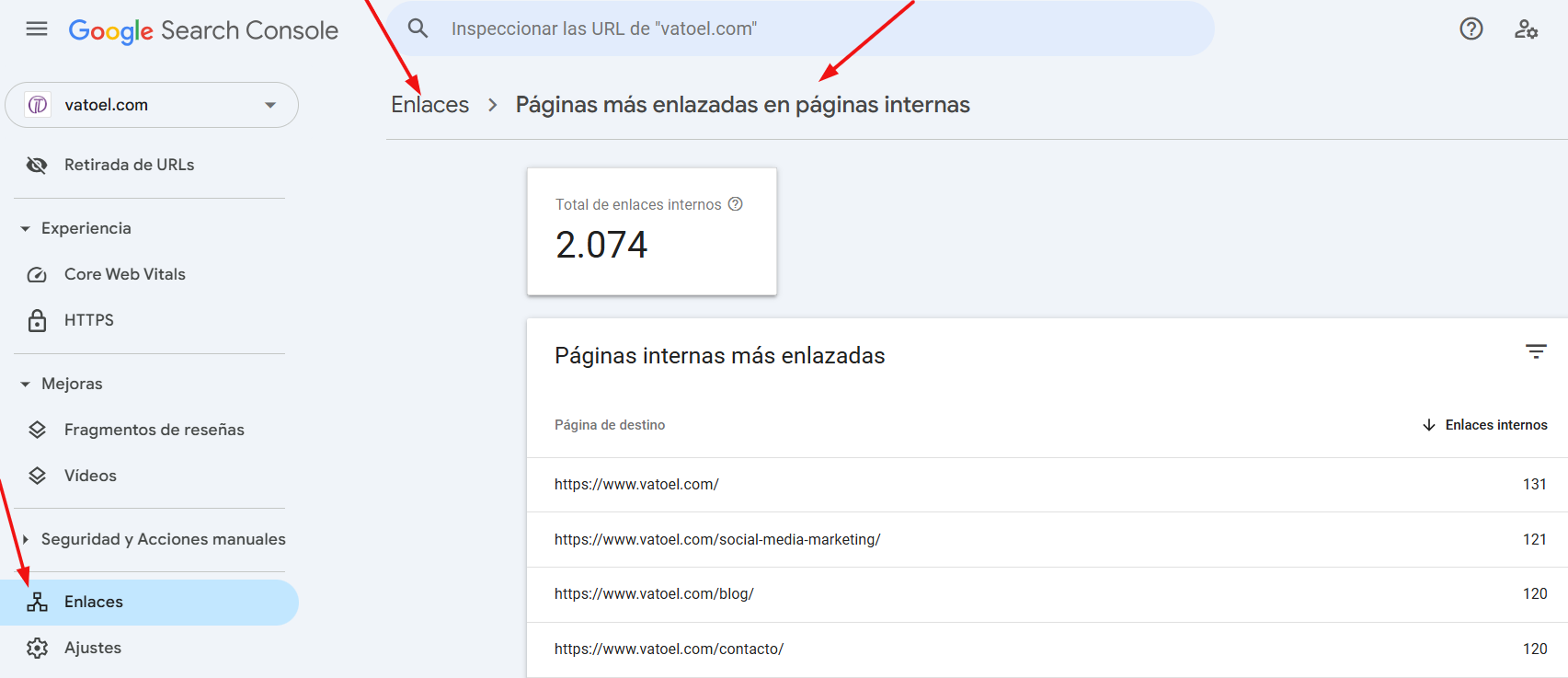
To see a website's internal links, you can use SEO tools such as Google Search Console, which is free and easy to use.
Simply log in to your account, go to the "Links" section and then to "Internal links". There you will see a list of the most linked pages on your site, and by clicking on each one you can see which URLs link to it.
Another option is to use plugins such as Link Whisper, ideal if you work with WordPress. This plugin uses artificial intelligence to suggest internal links as you write your articles and can even create them automatically with its Auto-Linking feature. It has a free version and is very useful for improving your interlinking strategy hassle-free.
Conclusions:
In this article we have seen the importance of internal links: although we always value backlinks as the drivers of a project's SEO improvement, internal linking (interlinking) is a good foundation before you start buying links.
Do you need advice for your project?
Request a quote now!
Request a quote for your backlink strategy
Shall we talk about your project?
Tell us what you need (full name, email, website, message) and we'll get back to you within 24 hours.
Send