

After months of work, we are delighted to finally present Getalink 3.0, our new marketplace, with a redesigned interface and new features that let you buy links on media outlets and blogs across every niche, including sensitive ones.
That is why we have created this user guide, in which we explain how our SEO backlinks platform works and how to get the most out of all the advantages it offers.
We also work on reputation and have added new services for GBP reviews, national and international press releases and local citations, as well as link insertions in already published posts and much more.
Let's get started!
How does Getalink work?
The first thing you need to do is sign up to create a new account. If you are already registered, simply log in.
To do so, go to the registration page linked below and enter your email address and a password.
Get started nowDashboard, the platform's home page
On your dashboard you will always see the control panel on your left so you can navigate through all the features.
You can track the status of your latest orders (pending / in progress / completed), as well as your available balance and statistics on purchased links, your profile, the affiliate system and your billing history.
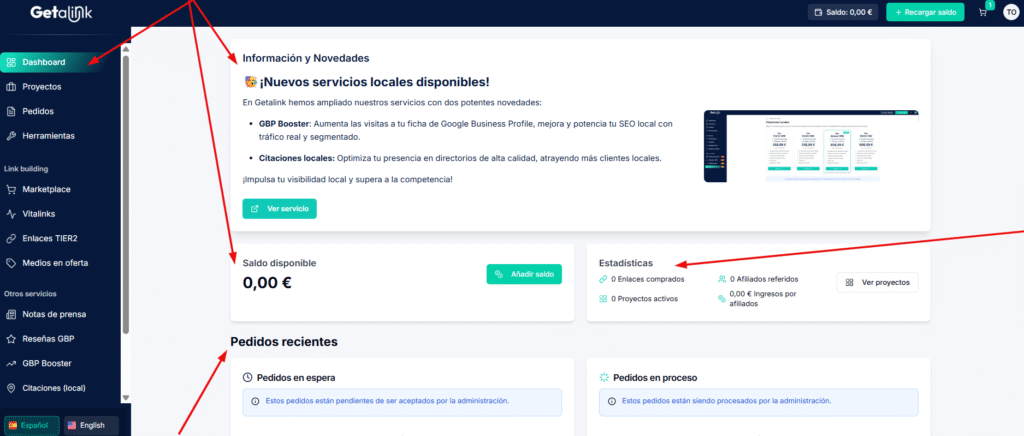
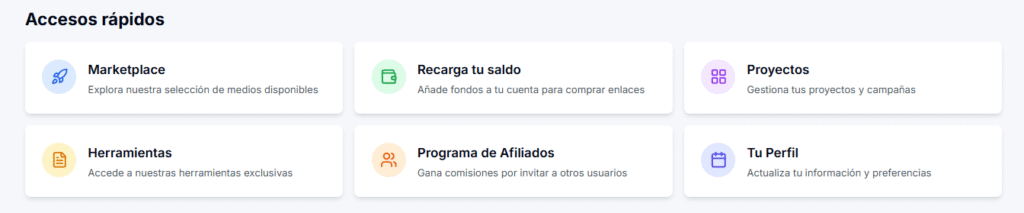
You also have shortcuts to "Projects" and "Orders" to manage your day-to-day work, and from here you can access the "Tools" and "Marketplace" options.
There is now also a "News and Updates" block showing Getalink's new services (e.g. GBP Booster and Local Citations, as you can see in the screenshot).
How do I top up my balance?
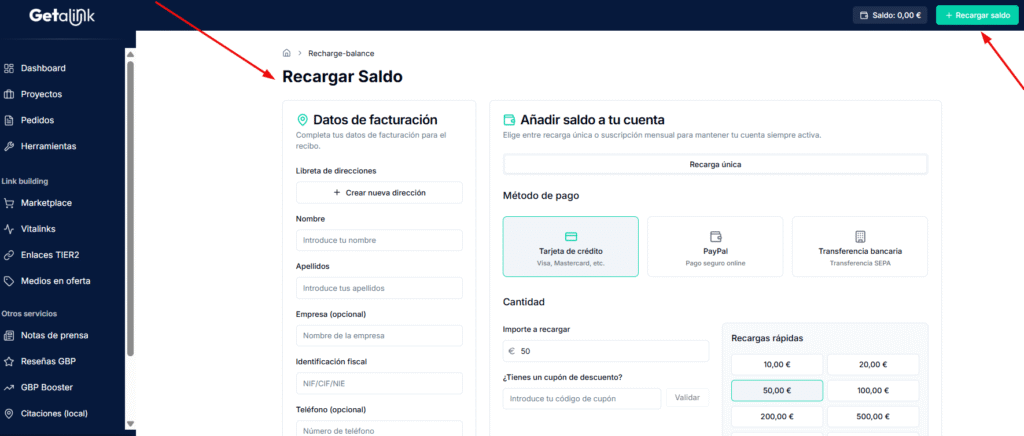
This section is used to add funds to your account, check your available balance, view past transactions and manage your funds. To use it:
- Fill in your billing details (name, tax ID, address, etc.). If you have already saved them in your profile, they are filled in automatically.
- Choose the payment method (online payment or bank transfer) and the amount. You must choose between a one-off top-up or a monthly subscription to keep your account always active.
- If you have a coupon, enter it and validate it before confirming. Sometimes there are promotions with extra balance on your first top-up.
- Confirm the top-up and the balance will be available to buy links on the Marketplace.
Your profile
In this option, you need to complete your basic account information and your tax details (company name/name, tax ID, address, language, etc.).
We recommend activating the subscription to our weekly newsletter, as it includes offers and news from the world of SEO, AI, link building and digital business.
In this section you can also create your address books. This is ideal for link building agencies and freelancers who manage several clients (orders) and need to invoice from different tax addresses.
With the same aim, there is the "Users and roles" option to give clients permission on your account.
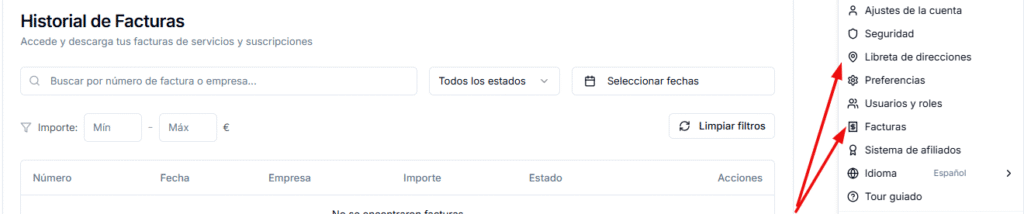
Invoices
From this section you can manage invoices, download them as PDFs in one click and keep track of payments and income.
Affiliate system
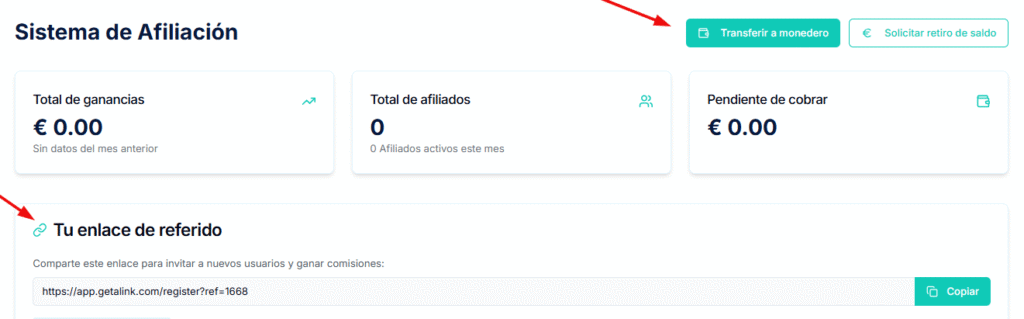
This option shows your affiliate panel, with your affiliate link, the evolution of your earnings and the balance pending payment.
To use it, copy the link, share it (blog, social media, newsletter) and earn a 7% commission.
Projects, manage your campaigns
This module is used to organise your link building by projects (domains and brands). You can create up to 3 projects per account and it works like this:
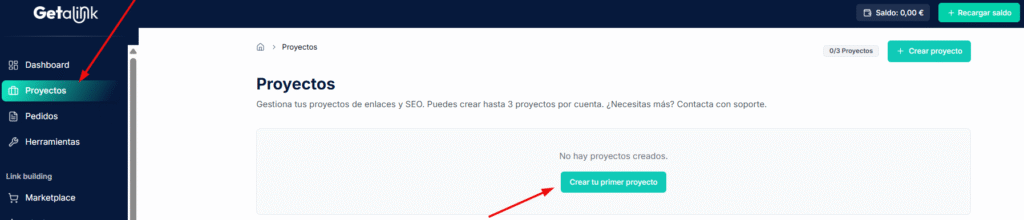
- Create a project for each domain or business line.
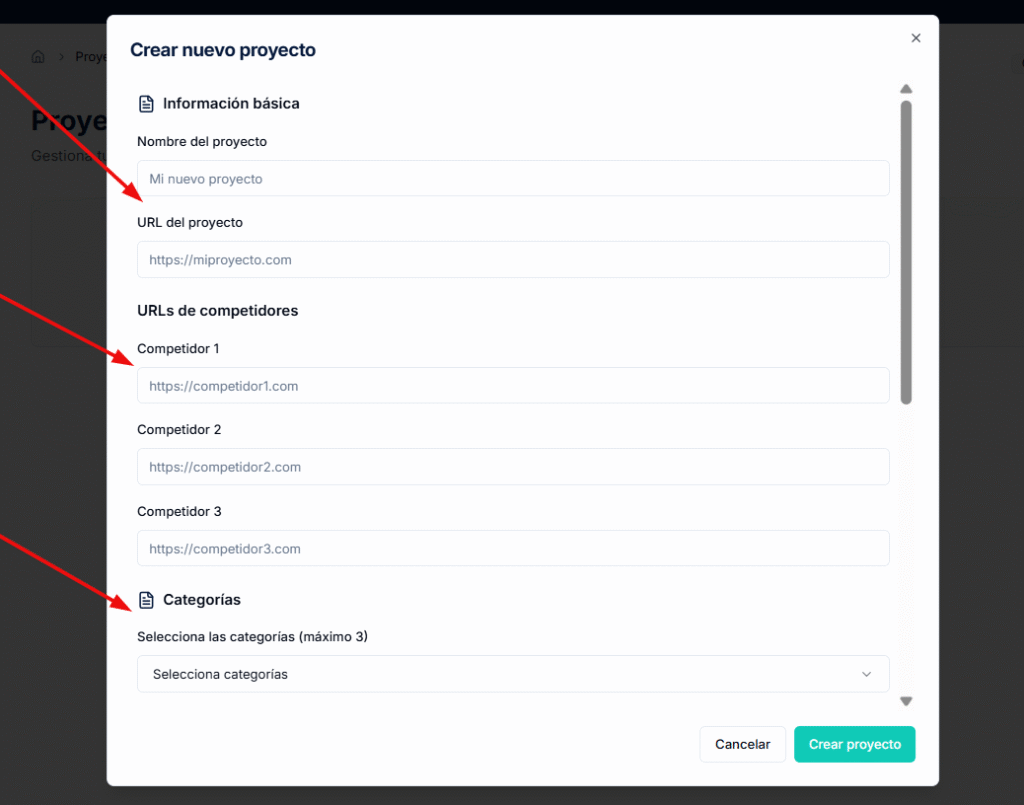
- Project name and URL: give it an easily identifiable name (brand, domain or client). This will help you filter orders and reports later. As for the URL, enter the one you want to boost (home page or key landing page) so that our affinity system can suggest suitable media outlets.
- Competitor URLs: add up to three direct competitors so we can analyse their link profile.
- Categories: select up to 3 categories related to your project. This helps the platform suggest truly relevant media outlets.
- Targeting and Affinity: choose language, country and keywords (enter 20-30 separate keywords so that the affinity algorithm can return more relevant media suggestions).
- Maximum budget: set the project's spending cap here and the platform will warn you when you approach the limit, so you keep control of your investment without surprises. New in Getalink 3.0 is an improved project system with budget allocation.
- Budget type: you have two options, general (it stays the same) or monthly (it resets every month).
Orders, a list with the status of each one
In this section you will find a list of your orders and their status: pending, in progress, completed, cancelled or rejected. To use it:
- Filter by project or date, or search by media outlet/URL/anchor.
- Open each order to see its details.
Tools
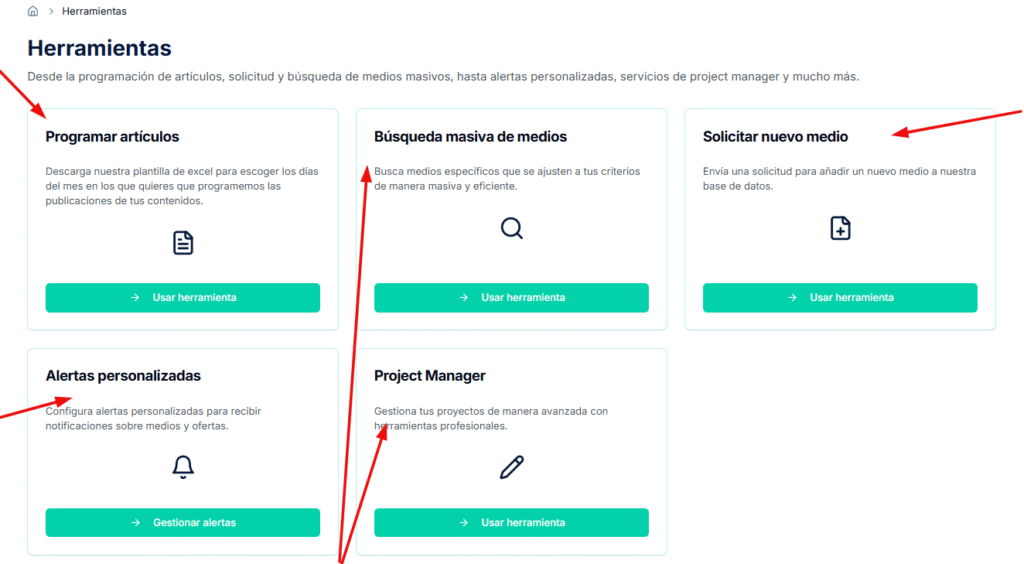
The "Tools" feature is a suite of utilities that will help you speed up tasks and optimise costs. They are as follows:
- Schedule articles: with this option you can download our Excel template to choose the days of the month on which you want us to schedule the publications.
- Bulk media search: find media outlets in bulk. Search up to 150 outlets at once and make new requests every 5 minutes.
- Request a new media outlet: ask for a specific outlet that is not yet on Getalink to be added by entering its URL, and our outreach team will take care of contacting them.
- Custom alerts: set up this section to receive alerts about media outlets and offers according to your preferences.
- Project Manager (managed service): delegate to an expert who will professionally support your link building campaigns. Request a personalised strategy based on your business and budget by filling in the fields shown. From €400/month of investment, with no minimum commitment.
Marketplace, to buy quality SEO links
In this section you will find a list of more than 20,000 media outlets where you can use the filters to find the ideal one for buying sponsored articles that include your links.
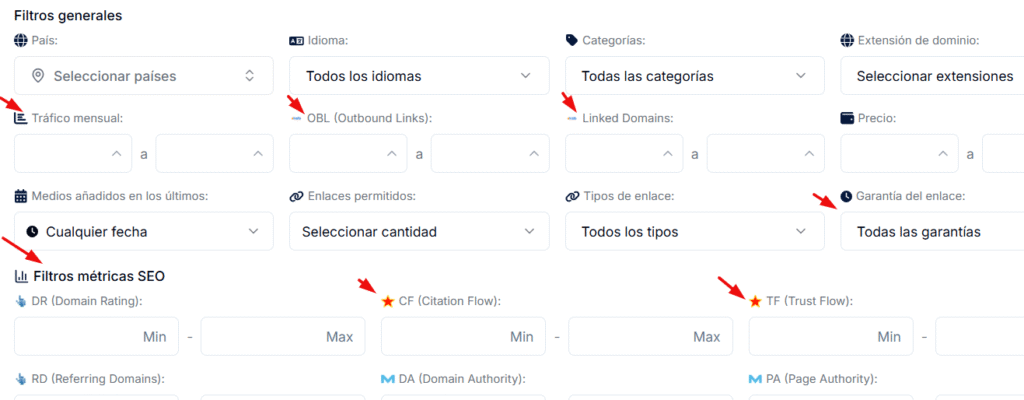
General filters
- Country, language and category: segment by geography, language and topic.
- Domain extension: filter by TLD (.es, .com, .fr…).
- Monthly traffic: estimated number of organic visits.
- Ahrefs OBL (Outbound Links): number of outbound links on the site. A lower OBL usually means greater SEO potential for the site.
- Ahrefs Linked Domains: how many unique domains the site links to (outbound).
- Price: set your budget per post.
- Media outlets added in the last month, year...: discover recent additions.
- Links allowed: number of links the outlet allows in the article.
- Link types: DoFollow / NoFollow / Sponsored, according to the outlet's policy.
- Link guarantee: filter by guarantee duration (permanent, 12 months, etc.).
SEO metrics filters
- Ahrefs DR (Domain Rating): strength of the domain's link profile (0–100 scale, logarithmic).
- Majestic CF/TF (Citation Flow / Trust Flow): power (CF) and quality/trustworthiness (TF) of the link profile.
- Ahrefs RD (Referring Domains): number of domains linking to the site; more RDs usually correlate with more traffic.
- Moz DA / PA (Domain Authority / Page Authority): likelihood of a domain or page ranking (0–100).
Other filters you can choose
- Google News (appears on Google News): filter media outlets with a presence on Google News.
- Allows insertions: shows outlets that accept link insertions in already published articles.
- Allows citations: outlets that accept citations/listings (brand/NAP mentions or listings).
- Publishes on the home page: outlets that promote the article you are buying on their home page.
- Show favourites / Show discarded: switch between your saved lists.
- Hide sponsored: excludes sites that mark links as Sponsored.
- Hide already purchased: avoids repeating media outlets.
- Show new only / Show rising traffic: new outlets and growing traffic trends.

Metrics of the chosen media outlet
Open the outlet's profile to see all the details. Each media outlet contains information on:
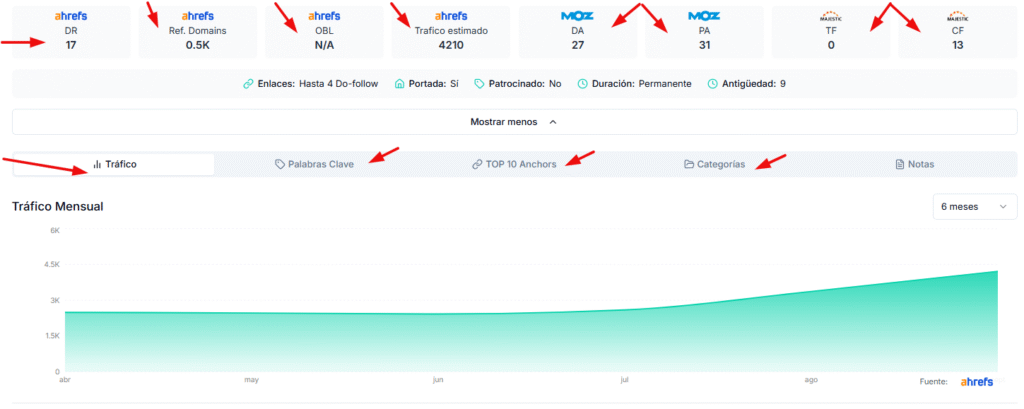
The type of outlet, language, location, available links and link type, the offer price (if applicable) and base price, whether or not it publishes on the home page, post duration and domain age.
As for the SEO metrics: Ahrefs DR and referring domains, Ahrefs OBL and estimated traffic, Moz DA and PA, and Majestic Trust Flow and Citation Flow.
You will also see data on the outlet's traffic trend, ranking keywords, top 10 anchor texts and the sensitive categories it accepts.
Place your order
Once you have chosen the outlet that best suits your project, it is time to place your order:
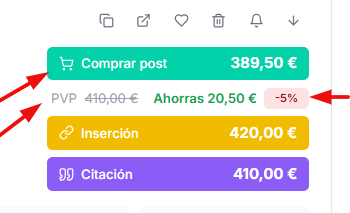
Click Buy post and fill in the fields:
- Requires writing: if you tick it, our team of writers will create an original article of at least 600 words (included).
- Minimum number of words: you can keep the minimum or ask for more under "Other details".
- Project: you can link the order to a project by selecting it, so the order stays organised and the spend counts towards its budget.
- Delivery deadline (mandatory): the latest publication date you need.
- Preferred delivery date (optional): preferred date within the range; it becomes available once you have chosen the deadline.
- Category (mandatory): choose the topic that best fits your content.
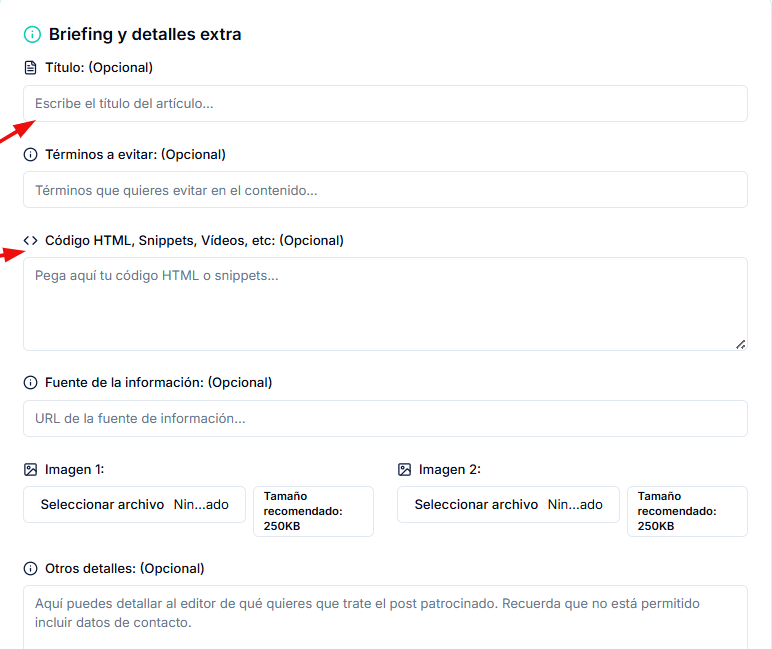
- Briefing and extra details: title, terms to avoid, images, videos to embed, etc.
- Links and anchor: define up to 4 links per order, each with its own fields: keyword, anchor text, destination URL, link type and boost link (optional).
Once you have filled in all the fields, click "add to basket". Then all that is left is to complete the payment by clicking "checkout". As you have already set up your payment method in the "top up balance" option, the order is done.
Within 5 working days your article will be published with your link, after you have confirmed that the order is correct. It's that simple!
New EEAT Service
You can now request that your articles be written and signed by recognised journalists in your sector. This new option, available as an upsell when ordering a mention or article, is designed to dramatically improve your website's EEAT (Expertise, Authoritativeness, Trustworthiness).
So, how can I start using it? When you place a new order on Getalink and fill in the required fields (title, anchor, URL, etc.), you will also see a new section called E.E.A.T.
Here you will have a drop-down menu to choose the expert journalist who will write and sign the content. You can view their social media profiles as well as reference URLs of their bylines in major media outlets.
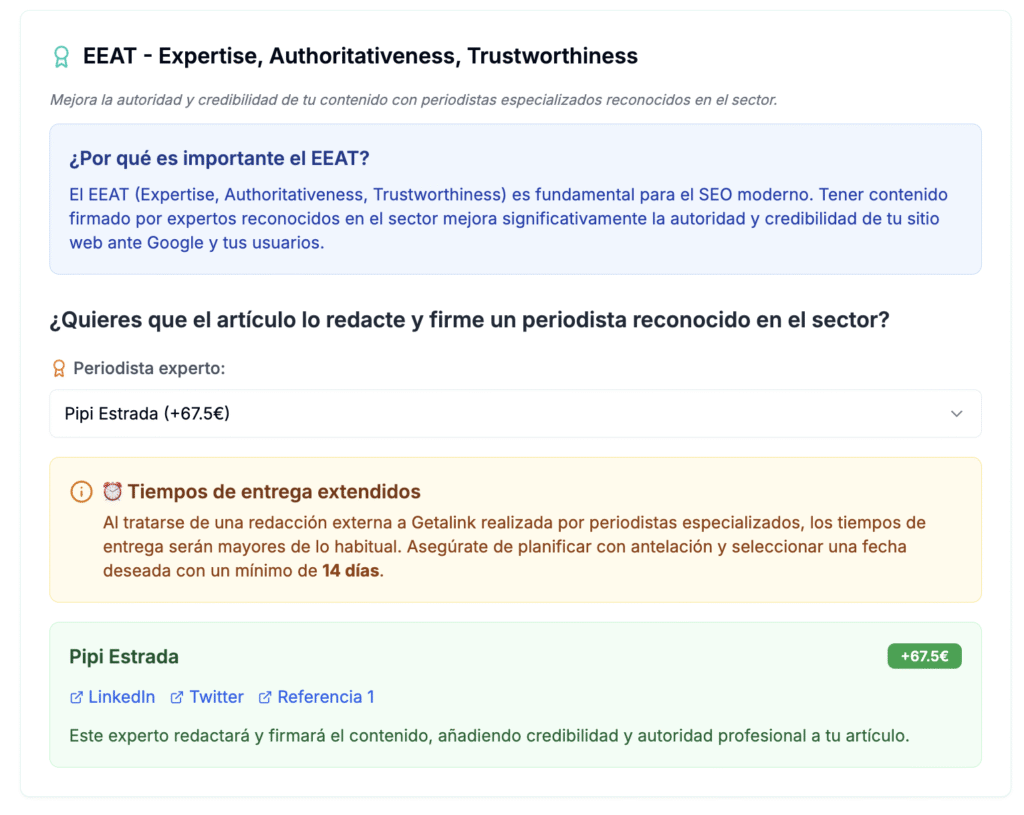
Why is it so important? Google increasingly values content with expert authorship. Including the byline of a professional journalist not only adds credibility, but also strengthens topical authority and the trust you build with your users.
- Professional byline with a real name
- Improved EEAT and editorial perception
- Ideal for sensitive sectors such as health, legal, finance and technology
Plan ahead: deliveries require a minimum of 14 days.
Managed Link Building Service
We take care of your entire link building strategy for you: one of our experts will analyse your project, select the most relevant, high-quality media outlets for your business, design a tailored strategy and run the campaign from start to finish.
If you don't know much about link building or which link to buy, keep it simple and trust Getalink.
From €400/month of investment, you will save time and resources, avoid the risks of unreliable media outlets and, above all, gain trust, visibility and authority every month, which is so necessary now with AI.

Vitalinks
One of the new features of Getalink 3.0 is "Vitalinks". This option is based on sending visits to links that have already been published, with the aim of increasing the authority of the external page.
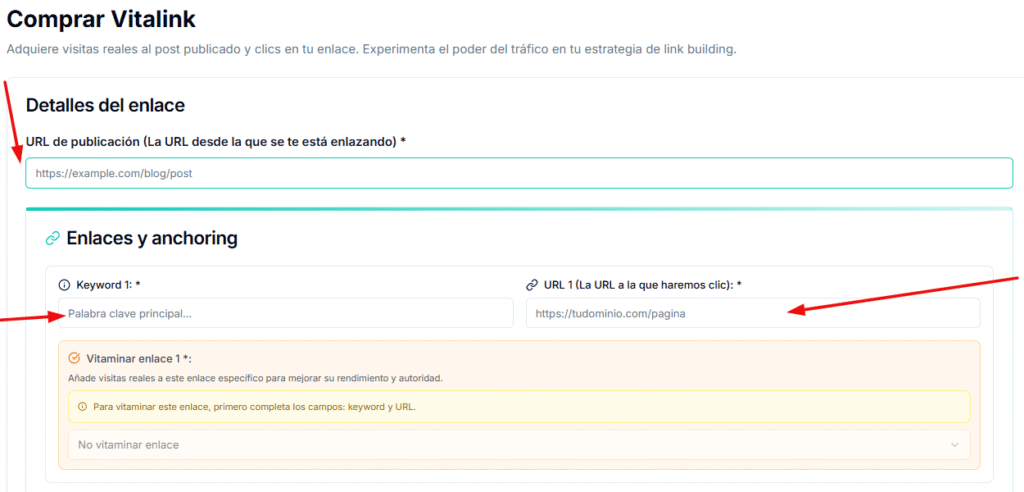
To buy them, paste the URL of the publication where your link appears, define Keyword 1 (main anchor) and the URL where the clicks will go.
Now activate "Boost link 1" to send real visits to the post and generate clicks on your link. All that is left is to click "add to basket".
Link Booster
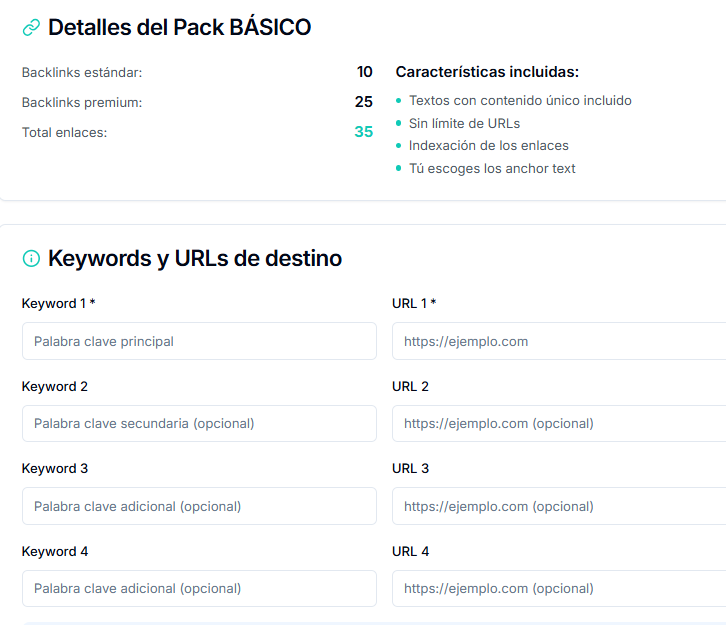
This option offers TIER 2 links (Link Booster) to power up your main backlinks, pointing links at the pages where you already have links (Tier 1) in order to strengthen the latter.
To use it, choose a pack (all include texts with unique content and link indexing, you choose the anchor texts and there is no URL limit), enter the keywords and the Tier 1 URLs to strengthen, and you're done.
Media outlets on offer
This is the media outlets on offer section and, just like in the marketplace, all available outlets are shown so you can use the filters to reach the right one.
Press releases (New service)
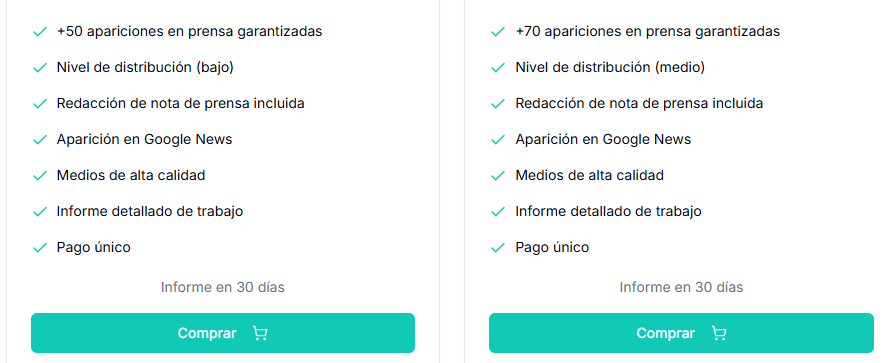
This is another of the new services offered by the platform and involves managing press releases to spread your brand across digital media and strengthen your off-page SEO strategy. To use it, you need to:
Choose the plan that best suits your business and either take care of the writing yourself or leave it in the hands of our journalists, who will professionally write your press release.
To do so, you need to provide the basic information (key message, company details, links). The release is then written and distributed, and you receive a detailed report within 30 days with the press coverage.
It also gives you the option of downloading a sample report.
GBP Reviews (Google Business Profile)
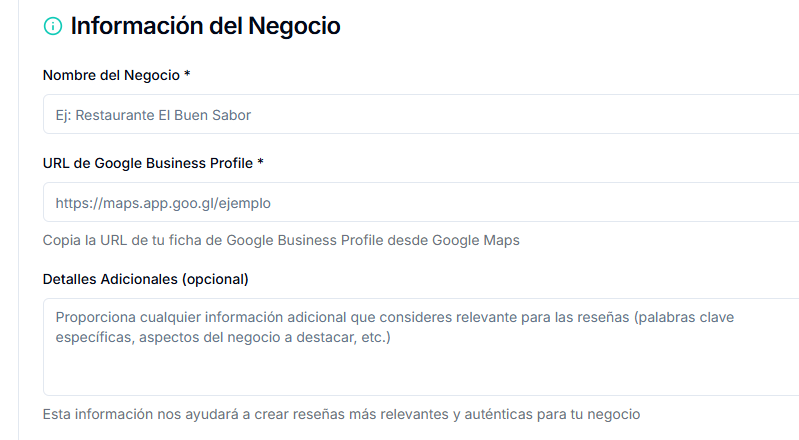
This new review service helps strengthen your business's local SEO. Choose from the available packs and set up your order with the URL of your Google listing and the business name, and under "Order details" you can customise the content of the review.
Within a few days, real reviews will gradually appear on your business listing.
New service: GBP Optimisation
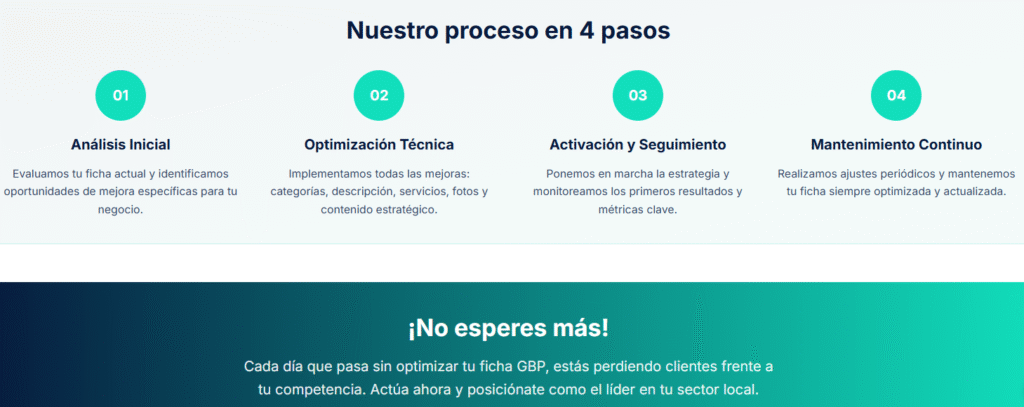
This GBP optimisation service is designed to improve your business's local visibility. We take care of fully optimising your listing, from the initial setup (name, category, opening hours, images) to creating strategic posts and managing reviews.
For a one-off payment of €333 or €669, depending on the plan you choose, Getalink 3.0 offers you its own methodology to gain more visibility and local relevance.
GMB Booster
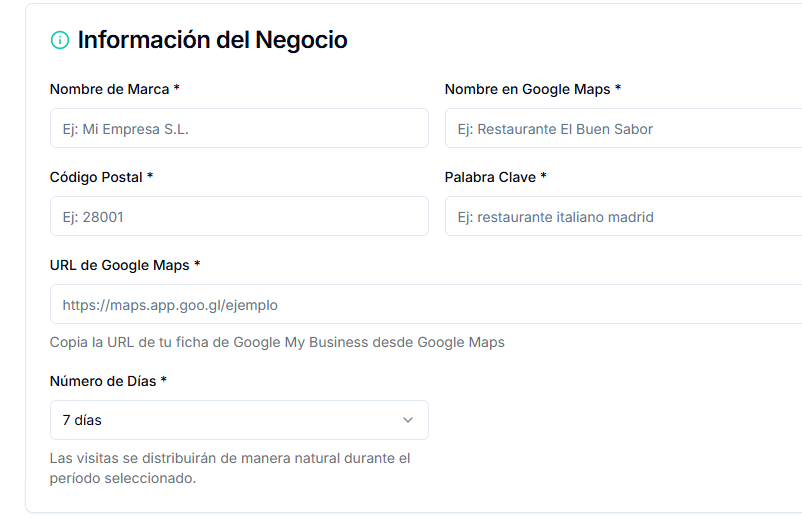
GMB Booster is a new service created to increase visits to your Google Business Profile listing with real traffic to improve local visibility.
Simply go to the corresponding tab and place your order. Visits start within 24–48 hours and are spread naturally over the contracted period.
Local citations
This is another of the new services in Getalink 3.0 and involves listing your business in local directories and listings (with or without a link) to win more local customers. It also reinforces NAP consistency and improves visibility in a specific area.
Regardless of the pack you choose, local citations start being published within 7–14 days, and the full impact is usually seen within 30–60 days depending on the sector and the competition.
Help and support
You can contact the Getalink team via an integrated live chat (LiveChat), quickly and in real time, to resolve any questions about using the platform.
Just open the "Help and support" tab and you will find the contact details (phone, email, Telegram and chat).
Frequently asked questions
What benefits does Getalink offer?
Boost your SEO and your brand with appearances in newspapers, magazines and niche blogs, combining link building and PR to improve your website's authority.
What does the catalogue include and which sectors does it cover?
An international catalogue with more than 20,500 media outlets and a presence in more than 30 countries, with broad topic coverage, including sensitive niches such as CBD, betting, casinos and crypto.
How do I place an order on Getalink?
Go to the Marketplace, use the filters you need to find the ideal outlet and buy the article by filling in the details; pay and track the status under "Orders" until you receive the final published URL.
Can I provide the content?
Yes. Writing is included by default (original articles, minimum 600 words), but if you prefer you can send your own content.
How long does it take for the article to be published?
As a general rule, around 5 working days, although this may vary depending on the outlet's editorial calendar and whether you provide the text or our team writes it.
Can I request a refund?
Yes, if the content has not been delivered within the first 14 days after the order. Once the final URL has been delivered, no refund is possible.
Which payment methods can I use?
PayPal, bank card or bank transfer. (Cryptocurrencies coming soon.)
And that brings us to the end of our complete Getalink guide. Do you have any other questions?
Request a quote for your backlink strategy
Shall we talk about your project?
Tell us what you need (full name, email, website, message) and we'll get back to you within 24 hours.
Send