

We are launching the new Getalink publisher dashboard, the most complete in the industry, so you can earn money by publishing articles on your blogs, selling links, link insertions, mentions…
All you have to do is add your websites, write the orders yourself or hand them over to our team, and start selling sponsored posts
You will reach more than 4,000 potential clients, as the number of registered clients grows every day, and with it your chances of selling. You can also request payouts every 15 days by bank transfer or PayPal, and keep track of the payments and invoices you have received.
In this guide, we explain step by step how our publisher platform works, so you can monetise your website by publishing articles, mentions, link insertions and more. Let's get started!
Getalink publisher dashboard: sign up and earn money with your blogs
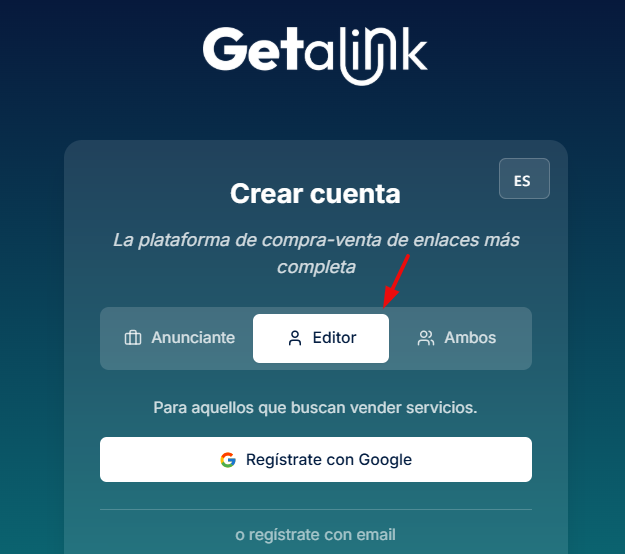
To earn money by publishing articles on your blogs, the first thing you need to do is sign up to create a new account. If you are already registered, simply log in. To do so, go to the sign-up page and enter your email address and a password.
Publisher dashboard overview
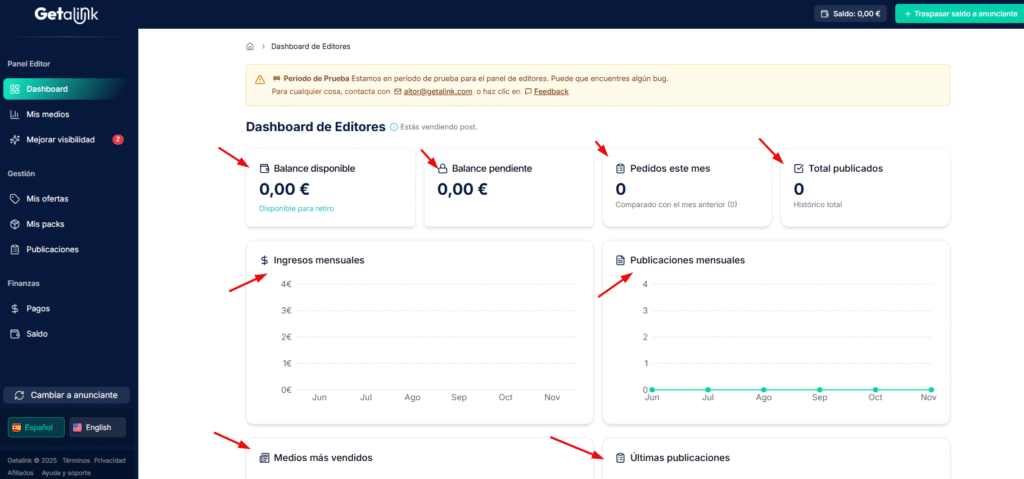
When you sign up or log in to your publisher account, you land on the “Dashboard”. This section is the main control panel, where you get an overview of your earnings, statistics and recent activity, and from which you can access all the other features for selling sponsored posts. It shows several statistics, such as:
Balance (money):
- Available balance, which is the released money (approved by the advertiser) that you can withdraw whenever you like, with no minimum amount. Go to “Request Payment” and upload your invoice.
- And pending balance, which covers orders in progress. This is the amount generated but not yet released.
Activity (orders/publications):
- Orders this month (compared with the previous month).
- And the total number of published orders (all-time total), which is the sum of completed publications throughout your history as a publisher.
Metrics (charts):
You will see several charts:
- A bar chart with your monthly income.
- Number of monthly publications. We recommend using these two charts to spot seasonality, strong months and the effect of offers/packs on your results.
- Best-selling media (Media | Sales | Income).
- Latest publications (ID | Title | Media | Date | Status): A list of the latest orders and their status (On hold/In progress/Under review/Completed).
- “View all” link: Opens the full list of orders in “Publications” (equivalent to going to /editores/publicaciones). There you will see all orders with filters and actions (accept, submit URL, etc.).
As the publisher dashboard is in its trial period, a notice tells you that if you find a bug, you can report the issue or send a suggestion via the Feedback button or by email to “aitor@getalink.com”, which is much appreciated.
Income summary (Balance):
In the central or upper part of the Dashboard, you will see how much you have earned from sponsored posts sold. This balance summary keeps your income always visible, so you have clear control over your earnings.
Transfer balance to advertiser:
Use this option to move your publisher balance (from completed orders) to your advertiser account, so you can use it to buy sponsored posts or other services. How it works:
- Select the completed orders you want to transfer.
- Check the total to be transferred.
- Click Transfer to confirm (or Cancel to exit).
Navigation menu:
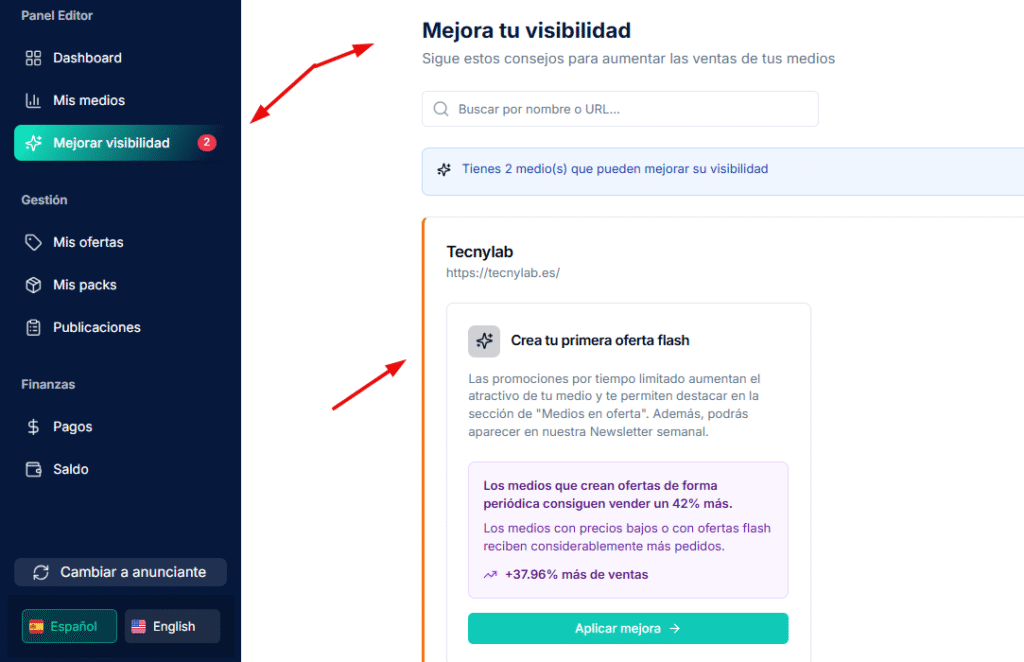
On the left (or in the side menu) of the Dashboard, you have the navigation menu with all the sections of the publisher dashboard, which we will explain step by step:
- My media
- Improve visibility
- My offers
- My packs
- Publications
- Payments
- Balance
- Switch to advertiser
- Affiliates
- Help and support
My media: how do I add a site?
The “My Media” section is where you manage the catalogue of websites or blogs you have registered on Getalink. All your registered media appear here with their details, and from this page you can:
- Add a new site: To start earning money, click the “Add new media” button to register a blog and offer sponsored articles. Enter your site's URL and its information (category/topic, language, traffic or SEO metrics, base price per publication, number of links you accept per article, etc.).
How do I verify my site? To earn money publishing articles
It is very important that you follow the verification instructions to confirm ownership of your site. Only verified media are listed on the Getalink Marketplace as active and verified for advertisers.
You can also:
- Edit details and prices: You will see a list of every site you have added. You can click on a site to edit its details and adjust, for example, the price to keep it competitive.
- Activate/Deactivate media: If for some temporary reason you cannot accept new publications on one of your sites, you can pause (deactivate) that site.
Improve your visibility to sell more sponsored posts
This section offers personalised suggestions and recommendations to help you increase the visibility of your media within Getalink and attract more advertisers, so you can earn money by publishing articles on your blog. For example:
- Complete the profile of each site, adding mentions or link insertions.
- Verify the site.
- Create a flash offer, as time-limited promotions make your media stand out, which will help you get more orders.
My Offers
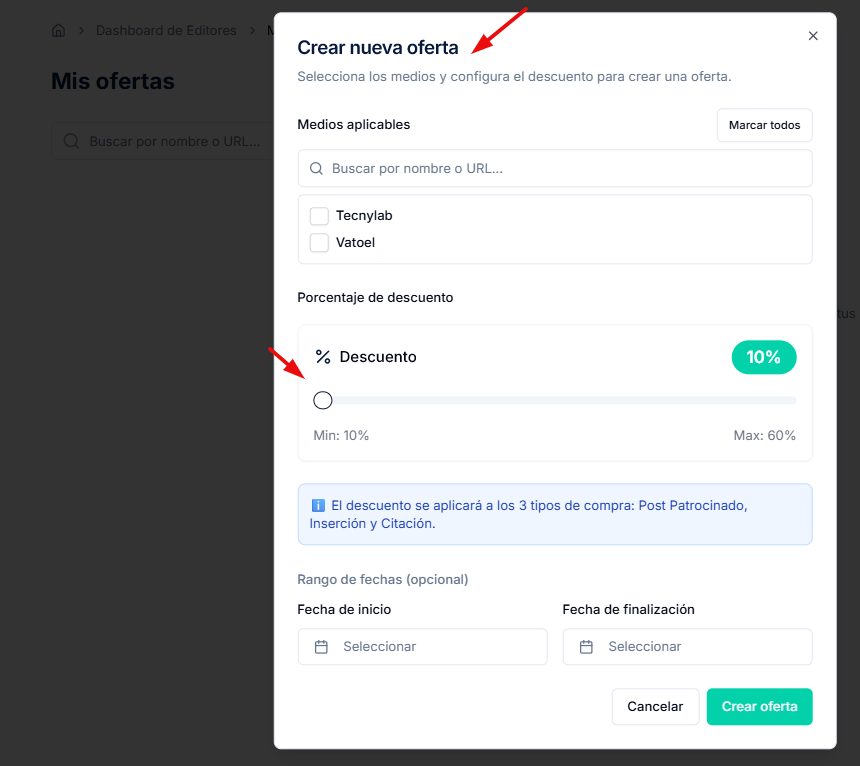
The “My offers” section lets you create and manage special offers for your media.
Click “new offer” to launch a discount: select one or more sites, set the discount percentage and choose the start and end dates.
The discount will apply to all 3 content types: sponsored post, link insertion and mention. For example: apply 10% to your blog and, once saved, the promotion will be visible to advertisers for as long as it lasts.
This feature is very useful for catching advertisers' attention, especially during periods of low demand or on special dates.
My Media Packs
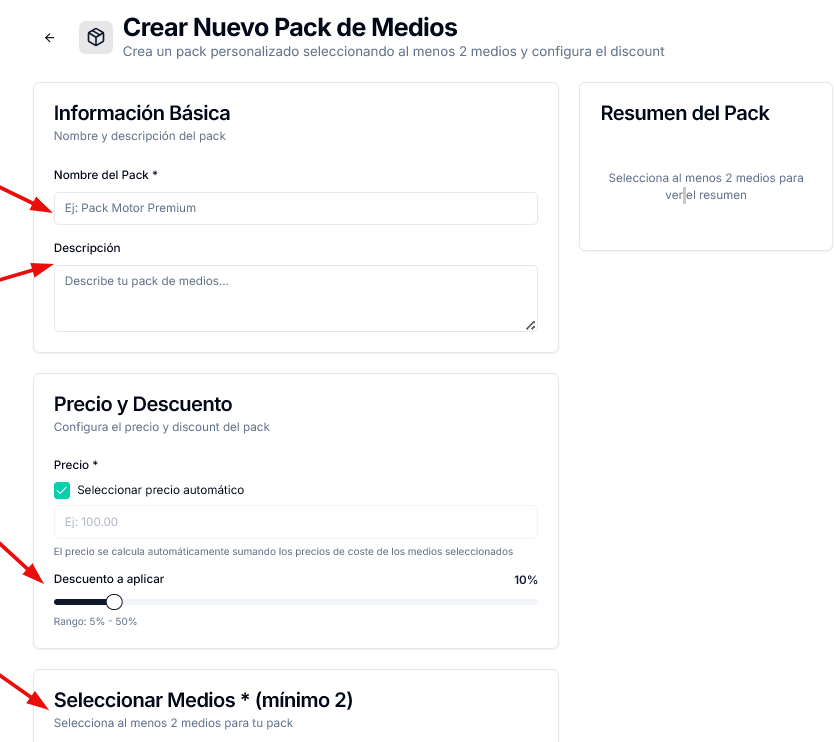
In this section you can create packs that combine several of your sites into a single bundle. Click new pack and a dialogue box will appear for you to fill in the information.
For example: Click “Create New Media Pack” and group at least 2 sites into a joint offer with its own price and discount.
- Pack name.
- Description: What it includes and who it is aimed at.
- Price and discount: Set a manual amount or tick “select automatic price” so it is calculated by adding up the cost prices of the chosen sites. Or select a discount between 5% and 50% (for example, 10%).
- Select media: At least two.
You will see the included sites, the base price, the discount and the final price. This will help you increase your orders.
Publications: earn money with every order
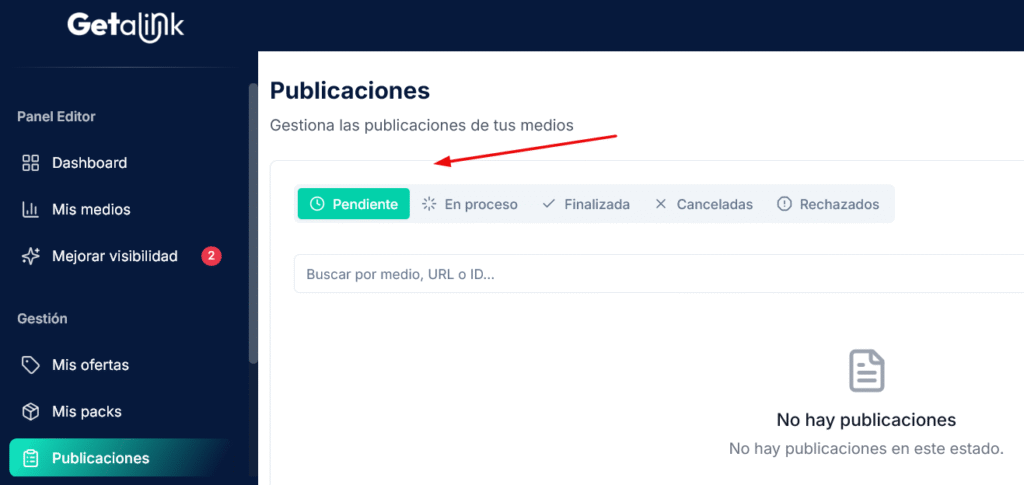
The “Publications” section lists all the sponsored article orders that advertisers have placed on your media. Basically, every time someone buys a sponsored post on one of your sites, a new order will appear in this section. You can also:
- View orders: A list of orders with their status (On hold, In progress, Completed) and details (site, topic, instructions, deadline).
- Accept/Reject: Review the request and accept it if it fits or reject it if not. Respond quickly to improve your conversion rate and reputation.
- Writing and publishing: Create original content following the instructions and publish it on your site in line with the rules.
- Submit URL: send the URL for review and make any adjustments requested.
- Closing and payment: once approved, it moves to Completed and the payment is released to your balance, ready to withdraw.
Make sure you meet the delivery deadlines and offer quality content: this will guarantee value for the advertiser and a good rating of your work, strengthening your reputation as a publisher on Getalink.
Request Payment
And now it is time to collect the money you have earned by publishing sponsored articles on your blogs. This “Request payment” section is where you manage your withdrawals from Getalink to your bank account or the payment method you have registered.
Unlike the balance, which simply shows what you have accumulated, this is where you start the withdrawal process by creating the request and attaching your invoice. Let's see how:
- Payout request: Check your available balance (completed publications) and send the request. There is no minimum: you can withdraw any amount.
- Invoice: Upload your invoice for the amount to be paid. Make sure your billing details are complete (name/company name, tax ID, address).
- Processing: The team validates and pays by bank transfer or PayPal every 15 days or on the agreed date.
- History: check the status of each withdrawal (pending/paid) and the dates.
What is the minimum amount I can withdraw?
No minimum amount to withdraw your earnings: a competitive advantage of the Getalink publisher dashboard.
Take note, this is very important: you do not have to wait until you reach a minimum amount of earnings to request payment, which makes Getalink “the publisher platform for selling sponsored posts that offers this competitive advantage”.
This gives you immediate cash flow, flexibility to get paid for each completed publication and the chance to reinvest quickly in your projects.

Balance (Wallet)
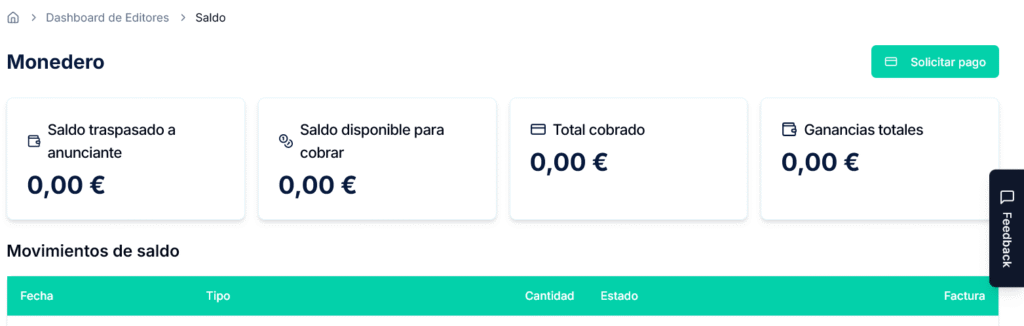
The “Balance” section (wallet) shows the breakdown of your accumulated earnings on the platform. Unlike the previous “Request Payment” option, this one is for information only. It tells you how much money you have earned by publishing sponsored content. It shows:
- Available balance: Money ready to withdraw (approved publications and affiliate commissions).
- Transaction history: A record of income and withdrawals (statement) so you can keep track of your earnings.
Switch to advertiser
This lets you switch the view of the publisher dashboard to advertiser mode.
Getalink is a platform where you can have both a publisher profile (selling sponsored posts) and an advertiser profile (buying links) with the same account, simply by switching between them.
If, as well as selling sponsored posts, you are also interested in buying links or articles for your own projects, advertiser mode is where you can explore the marketplace of more than 20,500 available media. From there you can find other blogs to publish your content on and manage your orders as an advertiser.
Affiliate programme
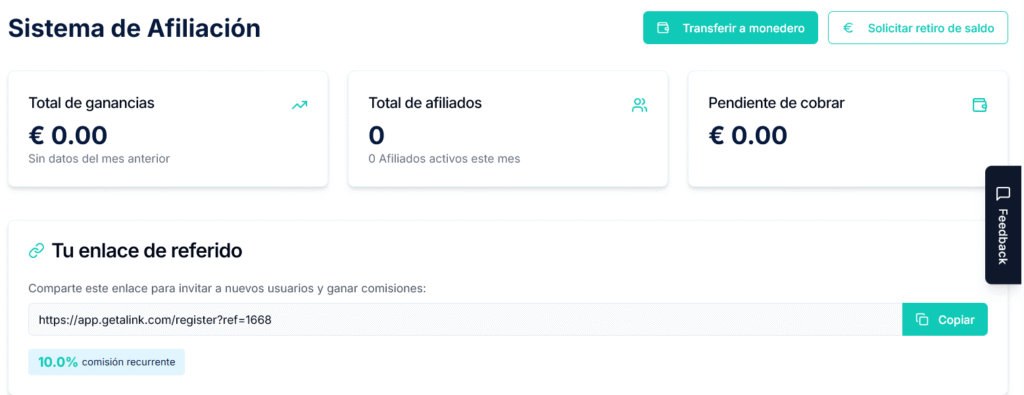
The Getalink affiliate programme lets you earn a 7% commission through a unique link. Share it on your blog and social media, and when an advertiser signs up with your link and makes a purchase, you receive the percentage of every purchase, including future ones (recurring income).
In the affiliates tab you will see your commissions and pending balance, which is added to your wallet and can be withdrawn just like your other earnings.
Help and support
You can contact the Getalink team through an integrated live chat (LiveChat), quickly and in real time, to resolve any questions you may have.
Click the “Help and support” tab and you will find the contact details (phone, email, Telegram and chat).
Use whichever channel you prefer and the team will help you get the most out of your blogs.
And that concludes our guide to the Getalink publisher dashboard.
Frequently asked questions about the publisher dashboard
How do I sell sponsored posts?
Booking your dream vacation is simple! Learn how to select destinations, customize your itinerary, and secure your booking through our easy process.
How can I earn money with my blog?
To monetise your blog with Getalink, go to the publisher dashboard, add your media and set your prices. Manage orders in the “publications” option (accept, write and publish, submit the URL) and request payment —with no minimum amount—.
How can I get more orders?
Check the “Suggestions” option to improve your visibility within Getalink. Create offers and media packs and respond quickly to orders.
When do I get paid my earnings?
Every 15 days.
What if I have any other questions?
If, after reading this guide to using the Getalink publisher dashboard, you still have questions, turn on the guided tour and you will get a step-by-step explanation of each section.